An AI assistant writes a good share of my FileMaker calculations these days, and the logic
is mostly fine. The shape is another story. One Let comes back with every variable on its
own line, the next one crammed inline; operators sometimes spaced, sometimes not; the
result variable called ~result today and something else tomorrow. Asking the model to
“always format it like this” only helps as long as it remembers. And honestly, my own
calculations drift the same way, between projects and between years.
Every other ecosystem I work in solved this long ago: prettier for TypeScript, gofmt for
Go. Nobody discusses shape in those languages anymore, because a tool owns it. So I built
fmstyle, the same thing for FileMaker calculations. You define your house style once in
an fmstyle.json, and every calculation that goes through fmstyle format comes out in
that shape, whoever or whatever wrote it.
fmstyle is also an old dream. I have wanted to build a real formatter for FileMaker for years, and a tokenizer, parser and printer for the full calculation grammar is exactly the kind of project that never survives next to client work. With an AI assistant doing the heavy lifting, it finally happened. Yes, the assistant that causes the drift also helped build the formatter that fixes it.
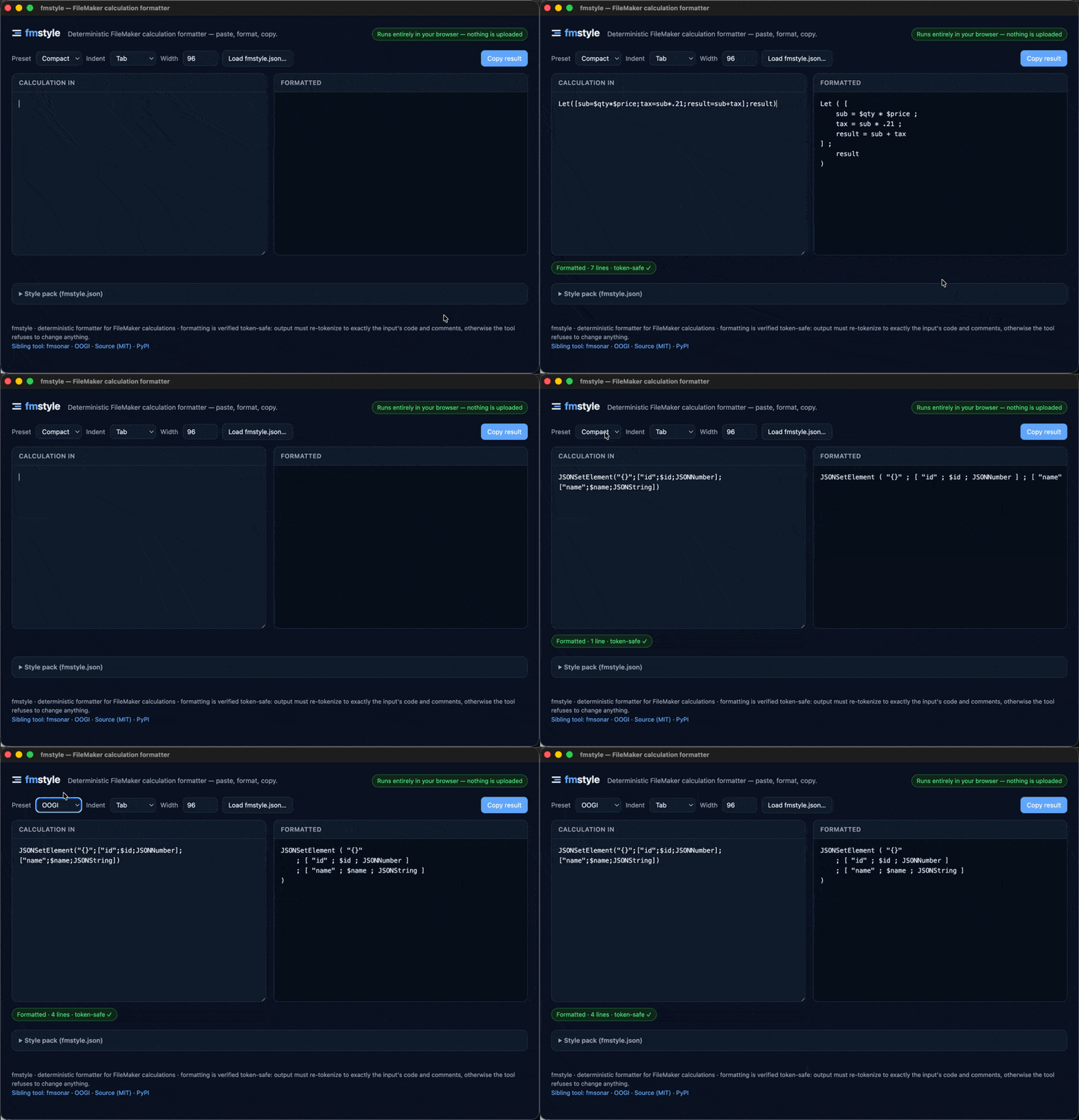
It must never change what a calculation computes
A formatter that could silently alter behaviour would be worse than no formatter, so this is where most of the engineering went. fmstyle re-tokenizes its own output and requires the exact same code tokens and comments as the input; if that check fails, it refuses to emit anything. If it cannot parse an expression, it changes nothing and says so. Formatting is also idempotent: running it twice gives byte-identical output to running it once, and there is a test asserting exactly that. The ≡ in the logo stands for this guarantee.
A style guide has two halves
Building the config changed how I read style guides. Our own FileMaker style guide was one prose document, but while translating it into rules I saw that it mixes two kinds of content that want to be treated differently:
- a mechanical half: indentation,
Letlayout, line width, naming patterns. Rules a tool can enforce without judgment. This half becomesfmstyle.json. - an advisory half: what things should be named after, when a
Whileis clearer than a recursive custom function, why a calculation should stay under a certain size. This half stays prose, written for humans and, increasingly, read by AI assistants too.
The split changes how AI-written code gets to house quality: the model handles the logic,
fmstyle format fixes the shape deterministically, and fmstyle lint checks the rules
that can be expressed as rules (explicit result variable, naming patterns). The prose half
travels along in the prompt for everything that cannot.
The split also changes what it takes to adopt a house style in a team. Share one
fmstyle.json, point everyone’s AI assistant at that same preset, and every calculation
written anywhere in the team comes out in house style from day one, including from the
developer who joined this morning. The mechanical half of a style guide becomes a file you
hand over instead of a habit that takes months of code review to grow.
What it handles
Any calculation expression: Let, While, Case, If, Substitute, ExecuteSQL, the
JSON functions, custom functions, plain operator expressions. Including the FileMaker
quirks that make parsing it non-trivial: the ≤ ≥ ≠ ¶ operators, field names with spaces
(Invoice Lines::Amount 2), ${quoted names}, $var and $$var, // and nestable
/* */ comments, [...] argument lists. Individual functions can get their own layout
rules, so JSONSetElement may explode while GetValue stays inline.
What it does not do yet: script steps. Only calculations are parsed today; script-step support is the top of the roadmap.

Try it
- Browser, no install: fmstyle.dev. Paste, format, copy; load
your own
fmstyle.json. Entirely client-side, no network requests. The page embeds a JS port of the Python engine, and a fixture suite requires byte-identical output between the two on every change. - CLI:
pipx install fmstyle, thenfmstyle format --writeon files or stdin, andfmstyle lintin pre-commit or CI. - AI assistant:
fmstyle install-skillteaches Claude Code to run every calculation it writes through the formatter before showing it. Any assistant with terminal access can do the same.
fmstyle is free and open source (MIT), and a sibling of fmsonar: the same philosophy of pure-stdlib Python, zero dependencies, and nothing ever leaving your machine. Source at github.com/oogi-io/fm-code-formatter.
Most house styles should be expressible as an fmstyle.json today. If yours needs a knob
that does not exist yet, say a layout rule or naming pattern the config cannot describe,
that is exactly the feedback I am after: open an issue on
GitHub or reach me through the
contact form and I will look at adding it. Style packs for real
organisations are the whole point of the tool.
Further out, I would love to see a community style pack: a preset the FileMaker community maintains itself, with the rules decided by votes and pull requests. If you would contribute to something like that, don’t hesitate to ping me.